
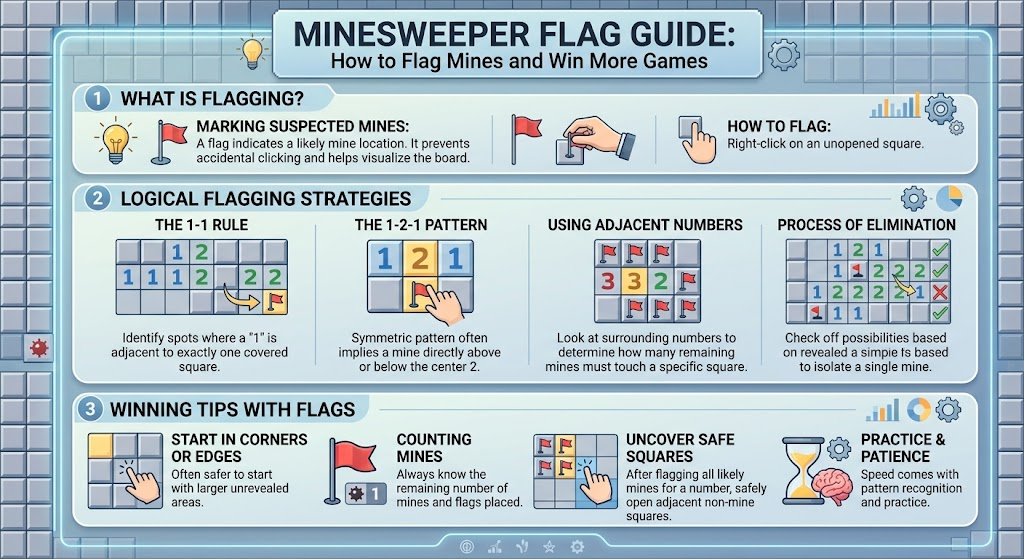
Minesweeper Flag Guide: How to Flag Mines and Win More Games
A minesweeper flag is one of the most useful tools in the classic Minesweeper game. It helps you mark a square that you believe contains a hidden mine. Instead of clicking that square by mistake, you can mark it and continue solving the safe parts of the board. This simple action can make difficult puzzles much easier to manage. It also helps you remember important clues when many unopened squares are close together. Minesweeper rewards careful thinking rather than fast clicking. Every number gives you information about nearby mines. A good flagging habit lets you use that information more clearly. Whether you play Minesweeper online, on a computer, or through a browser game, understanding flags is an important skill. In this guide, you will learn what flags mean, how to place them, when to remove them, and how experienced players use them wisely.
What Is a Minesweeper Flag?
A minesweeper flag is a marker placed on a covered square that you think contains a mine. The flag does not prove that a mine is actually there. It is mainly a visual reminder for the player. This difference is important because Minesweeper does not automatically make every flag correct. You must use the numbers around the square to decide whether your guess is logical. For example, if a revealed number shows that one nearby mine remains, you can often identify its location. Placing a flag then helps protect that square from accidental clicks. Flags are especially useful on large boards because remembering every suspected mine becomes difficult. They also make the puzzle easier to organize. Think of a flag as a note to yourself: “Do not click here yet.” Good players use flags as part of a larger strategy, not as random guesses.
How Does the Minesweeper Flag Work?
The minesweeper flag works as a marking system for unopened cells. On many desktop versions, you can right-click a covered square to place a flag. A second right-click may remove the flag, while some versions offer additional marking options. Touchscreen and mobile versions can use different controls. You may need to press and hold a square or use an on-screen button. The exact control depends on the game you are playing. Once a square is flagged, the game usually shows a small flag symbol instead of the covered tile. This makes the suspected mine easy to recognize. However, placing a flag normally does not remove the mine. The mine stays hidden underneath the square. You are simply marking its location. Always check the controls before starting if you are using an unfamiliar Minesweeper version.
Why Are Flags Important in Minesweeper?
The main purpose of a minesweeper flag is to reduce mistakes. Minesweeper boards can contain many covered squares, and some may look almost identical. A flag separates a suspected mine from other unopened spaces. This gives your brain a clearer picture of the puzzle. Flags also help you remember deductions made earlier. Imagine finding three possible mines near several numbered squares. You might understand the pattern now but forget it after solving another part of the board. Marking the suspected locations keeps that information visible. Flags can also help you count remaining mines. If a number touches the correct number of marked mines, nearby unopened squares may become safe. This creates a chain of deductions. The best players do not simply mark every square that looks dangerous. They use numbers, nearby flags, and remaining covered cells together.
How to Place a Flag Correctly
To place a minesweeper flag, first identify an unopened square that you believe contains a mine. On a typical desktop game, right-click the square. A flag icon should appear. Before doing this, look carefully at nearby numbers. Each number tells you how many mines are hidden in the surrounding eight squares. For example, a “1” means exactly one nearby square contains a mine. If seven surrounding squares are already known to be safe, the remaining covered square must contain that mine. You can then mark it with a flag. This approach is safer than placing flags based on appearance alone. A covered square never looks dangerous by itself. The surrounding clues provide the evidence. When playing on mobile, use the game’s flag control instead. Always confirm that the flag appeared before moving to another section of the board.
When Should You Use a Flag?
You should use a minesweeper flag when the available clues give you strong evidence that a square contains a mine. A common situation occurs when a numbered tile has only one unopened neighbor. If that number is “1,” the unopened neighbor must be a mine. Another example involves a “2” touching two unopened squares. If those are the only possible mine locations, both can be marked. You should avoid flagging squares simply because they seem likely to contain mines. A wrong flag can confuse your later deductions. It may cause you to believe that a number has already been satisfied when it has not. Good Minesweeper play is based on evidence. Before placing a flag, ask yourself what clue supports your decision. If you cannot explain why the square is dangerous, it may be better to leave it covered.
How to Remove a Wrong Flag
Sometimes a minesweeper flag turns out to be incorrect. This can happen when you misunderstood a number or made an early assumption. Removing the flag is simple in most versions. On desktop games, right-click the flagged square again. The marker will usually disappear. Some versions may cycle through different marking symbols instead. If your game behaves differently, check its controls. Removing incorrect flags is important because false information can create more mistakes. Suppose you mark a square as a mine and later discover that the surrounding numbers cannot support that decision. Do not keep the flag just because you placed it earlier. Good players are willing to change their assumptions. Minesweeper is a logic puzzle, so new evidence should always update your decisions. Treat flags as temporary notes when needed. They should help your reasoning, not control it.
Flags and Minesweeper Numbers
Numbers are the heart of Minesweeper, while flags are tools that help you use those numbers. Every revealed number tells you how many mines touch that square. The surrounding area can include up to eight neighboring cells. For instance, if a tile displays “3,” exactly three adjacent cells contain mines. A minesweeper flag can help you identify those three locations as you work through the puzzle. Once three nearby mines are confirmed, other covered cells around that number are safe. This is one of the most useful basic deductions in the game. It helps you move from guessing toward logical solving. Always count carefully. A flagged square should only count as a mine if you have good reason to believe it is one. The game usually does not verify your flag until you uncover the board or finish the puzzle. Your reasoning must therefore remain more important than the symbol itself.
A Simple Example of Flagging
Imagine you uncover a tile showing the number “1.” Around it are several covered squares. You inspect the area and discover that only one covered square can contain the mine. That square becomes your best deduction. You can place a flag there and then examine the other covered cells. Because the “1” already has its required mine, the remaining adjacent covered cells must be safe. This is where flagging becomes powerful. The flag gives you a visible reminder of the mine you have identified. It also helps you recognize which squares can be opened safely. You can repeat the same process across the board. Each confirmed mine can provide new information for nearby numbers. This creates a logical chain that gradually reveals more of the puzzle. A simple flag can therefore lead to several safe moves. That is why careful marking is more useful than rapid clicking.
Common Flagging Mistakes to Avoid
One common mistake is placing a minesweeper flag on every square that feels dangerous. This creates clutter and can make the board harder to understand. Another mistake is trusting a flag after the evidence changes. If a new number proves your earlier idea was wrong, remove the marker and reconsider the area. Some players also forget that a flag is not automatically a confirmed mine. It is only a player’s mark. Another problem occurs when people stop counting nearby mines. They may see a “2” and assume two mines remain, even though one has already been safely identified. Careful counting prevents this error. Finally, avoid using flags as a substitute for learning the number patterns. The strongest strategy combines logical deductions with clear markings. Use flags to support your thinking. Do not let them replace it.
Can You Win Without Using Flags?
Yes, you can solve Minesweeper without using flags. The game does not always require you to mark suspected mines. Some players prefer opening only the squares they know are safe. They mentally track mine locations or use the numbers directly. However, this becomes harder on large or complicated boards. A minesweeper flag gives you a simple way to store information directly on the puzzle. It can reduce mental effort and lower the chance of clicking a suspected mine later. Flags are especially helpful when several numbered areas overlap. You may need to remember the same mine while solving multiple sections. Writing that information on the board makes the process easier. Still, flags are a personal preference. If you can solve a board comfortably without them, that is completely valid. The important goal is to make accurate deductions and avoid mines.
Minesweeper Flag Controls on Different Devices
The way you place a minesweeper flag depends on the platform. Traditional desktop versions commonly use the right mouse button. Some browser games follow the same system. On phones and tablets, there may be a dedicated flag button, a long-press action, or another touch control. Some versions also allow you to switch between digging and flagging modes. This means there is no single control that works everywhere. Before beginning a serious game, test the controls on a safe area. Make sure you know how to place and remove a marker. This small step can prevent frustrating mistakes. You should also check whether your chosen version counts flags toward a mine counter. Some games display the number of remaining mines based on your marked squares. That counter can be useful, but it should not replace logical deduction. Always rely on the board’s numbers first.
Smart Flagging Strategies for Beginners
Beginners should focus on confirmed patterns rather than trying to mark mines quickly. Start by finding a revealed number with very few covered neighbors. These areas are usually easier to understand. If a number clearly identifies one dangerous square, mark it. Then look at the newly solved information around that flag. You may immediately discover safe squares. Another useful habit is to count flags around each number. If a “2” already touches two confirmed mines, its other covered neighbors are safe. This basic idea appears again and again in Minesweeper. Do not rush. Take a moment to count before every important click. You will make fewer mistakes and understand the board better. As your skills improve, you can learn more advanced patterns. For now, focus on accurate counting, careful marking, and safe deductions. These habits create a strong foundation for faster solving later.
Advanced Flagging Ideas
Experienced players use flags with more detailed patterns. They compare several numbered tiles at the same time. Suppose two nearby numbers share some covered squares but have different mine counts. The difference between those numbers can reveal where a mine must be located. A minesweeper flag can then mark the result and help unlock additional deductions. This method is often called pattern-based reasoning. It requires careful counting rather than guessing. Another useful technique is to compare overlapping groups of covered cells. If one number requires two mines among three cells, while another requires one mine among two shared cells, the shared information may reveal a safe location. These patterns can look difficult at first. With practice, they become easier to recognize. The key is to think about groups of squares rather than individual tiles. Flags help keep your confirmed discoveries visible while you continue solving.
Minesweeper Information and Quick Reference
The following table gives a simple reference for understanding the game’s basic details. It is more useful than memorizing complicated rules because it connects each feature with an action. The exact controls can differ between versions, but the core logic remains similar. A number always describes nearby mines, while a flag represents your own mark. The game board may contain different sizes and mine counts depending on the difficulty level. Beginners often start with smaller boards because they are easier to understand. Larger boards require more planning and careful information tracking. Use this table as a quick reminder while practicing. Once the basic ideas become familiar, you will naturally rely less on written guidance. The goal is not to memorize every detail. The goal is to understand how numbers, covered cells, safe moves, and flags work together.
| Feature | What It Means | Useful Tip |
| Game type | Logic puzzle | Use clues instead of random clicks |
| Covered square | Unopened cell | Inspect nearby numbers first |
| Mine | Dangerous hidden object | Never open a confirmed mine |
| Number 1 | One nearby mine | Search its surrounding cells |
| Number 2 | Two nearby mines | Count covered and marked cells |
| Number 3 | Three nearby mines | Compare nearby clues carefully |
| Flag | Your mine marker | Use it when evidence is strong |
| Safe square | Cell without a mine | Open it when clues support it |
| Empty square | No nearby mines | It may reveal a larger area |
| Mine counter | Remaining marked mines | Treat it as a guide, not proof |
| Beginner strategy | Simple deductions | Start with clear patterns |
| Advanced strategy | Pattern comparison | Compare overlapping number groups |
How Flags Can Make You Faster
Speed should come after accuracy. Once you understand flagging, it can make your games faster because you spend less time remembering locations. A minesweeper flag acts like a small note placed directly on the board. You do not need to repeatedly reconsider the same square. Instead, you can focus on nearby numbers and new deductions. Fast players also avoid unnecessary actions. They identify confirmed mines, mark them, and move toward safe areas. Over time, familiar patterns become almost automatic. However, speed should never encourage careless flagging. One incorrect marker can lead to several bad decisions. If you are trying to improve your time, first practice solving boards without mistakes. Then gradually increase your speed. Record your results if you enjoy competition. You may notice that better organization improves your times naturally. Efficient Minesweeper is mostly about reducing uncertainty, not simply clicking faster.
Is Every Flag Always Correct?
No. A flag is created by the player, so it can be wrong. This is one of the most important things beginners should understand. The game usually treats your marker as a personal note rather than proof of a mine. If you place a minesweeper flag incorrectly, the board may still allow you to continue. Your mistake becomes a problem when you use that false assumption to make another deduction. That is why strong players regularly check their reasoning. When new numbers appear, compare them with your existing flags. If everything fits, continue. If something does not fit, stop and investigate. You may have misunderstood one of the nearby clues. This habit makes your solving more reliable. Think of every flag as a conclusion that can be reviewed. Good puzzle solving is flexible. New evidence should always have the power to change your mind.
Tips for Better Minesweeper Flagging
A few simple habits can make your flagging much more effective. First, count every nearby mine carefully. Do not rely on a quick visual guess. Second, flag only when the evidence is strong enough. Third, check neighboring numbers after placing a marker. The new information may reveal safe cells immediately. Fourth, remove a flag when later evidence shows it is wrong. Fifth, keep your board organized. Too many unnecessary marks can make the puzzle confusing. Finally, practice common number patterns. The more patterns you recognize, the less often you will need to guess. Minesweeper is a game of information management. A clear board makes information easier to understand. Flags are valuable because they reduce mental workload. When used correctly, they help you turn scattered clues into a logical plan. That makes the game both easier and more enjoyable.
Frequently Asked Questions
1. What does a flag mean in Minesweeper?
A flag means you believe that a covered square contains a mine. It is a marker created by the player. The game does not necessarily confirm that your flag is correct. You should support every important flag with evidence from nearby numbers. This makes your decisions more reliable and helps prevent mistakes.
2. How do I place a Minesweeper flag?
On many desktop versions, you can right-click a covered square to place a flag. Mobile games may use long-press controls or a dedicated flag button. The exact method depends on the version you are playing. Test the controls before starting a difficult puzzle so you know how marking works.
3. Can I remove a flag in Minesweeper?
Yes. In many versions, right-clicking a flagged square again removes the marker. Other games may use a different control. Removing a flag is useful when new evidence shows that your original deduction was incorrect. Never keep a false flag simply because you placed it earlier.
4. Should I flag every possible mine?
No. It is usually better to flag squares when the evidence is strong. Random or uncertain flags can make the board harder to understand. They may also cause incorrect deductions later. Use nearby numbers to determine whether a mine must be present. Think of flags as logical notes rather than guesses.
5. Can flags help me solve Minesweeper faster?
Yes, especially on larger boards. Flags help you remember suspected mines and reduce mental effort. They also make it easier to count mines around numbered squares. However, flags do not automatically make you faster. Accurate reasoning comes first. With practice, good flagging can make your solving process more efficient.
6. Is the Minesweeper flag always a confirmed mine?
No. A flag represents your belief that a mine is underneath that square. It does not guarantee that your conclusion is correct. Always compare flags with the surrounding numbers. If later clues contradict your assumption, remove the flag and reconsider the area. This flexible approach leads to better results.
Conclusion
Learning to use the minesweeper flag is a simple step that can greatly improve your game. Flags help you organize information, remember suspected mines, and avoid accidental clicks. The most important lesson is that a flag should be based on evidence. Use the numbers around each covered square to guide your decisions. Do not mark cells simply because they look suspicious. As you practice, you will recognize common patterns more quickly. You will also become better at checking your assumptions when new clues appear. Minesweeper is not only about finding mines. It is about turning small pieces of information into safe decisions. Use flags as helpful notes, stay patient, and keep practicing. Once these habits become natural, even complicated boards can feel much more manageable. Try your next puzzle with careful counting and smart marking, and see how much your solving improves.